CyberAttacks and CyberSecurity#
Organizations Behaving Badly#
A zero-day exploit is a cyberattack that takes place before the security community and/or software developers become aware of and fix a security vulnerability. It takes advantage of security flaws that enable unauthorized users to gain access to a computer system or to download sensitive user data. Until a zero-day exploit is discovered and a patch is written to fix the underlying flaw, users of the software are vulnerable to the attack. Zero-day exploits have been found in widely used software such as Acrobat Reader, Adobe Flash Player, Apple iOS, Google Chrome, Java, Microsoft Internet Explorer, and Microsoft Windows.
The U.S. Federal Bureau of Investigation, Department of Defense, National Security Agency, and other government agencies spend heavily on information about vulnerabilities in computer systems. Packages of zero-day exploits have reportedly been sold to U.S. government contractors for $2.5 million a year. In many cases, these agencies choose not to inform the public about such cyber threats, leaving all users of the affected software vulnerable to the attack. The reasoning behind such an approach is that keeping a zero-day exploit vulnerability secret from others allows these intelligence and law enforcement agencies to create a powerful tool that can be wielded for espionage or cyberattack purposes.
In theory, U.S. agencies are not allowed to withhold “major” cybersecurity vulnerabilities from the companies affected by them, with few exceptions, under a policy known as the Vulnerability Equities Process (VEP). However, critics argue that this policy is not transparent (for instance, it is not clear what triggers the VEP or how many cybersecurity vulnerabilities have been disclosed to affected organizations). Under VEP, the Federal Bureau of Investigation (FBI) found an exception that allowed it to refuse to reveal the vulnerability that enabled it to hack into the iPhone of the San Bernandino shooter who killed 14 people in late 2015. In addition, because the VEP is an executive branch administrative policy—not a law or executive order—it can be overturned at any time by the president.
The Threat Landscape#
The security of data and information systems used in business is of utmost importance. Confidential business data and private customer and employee information must be safeguarded, and systems must be protected against malicious acts of theft or disruption. Although the need for security is obvious, it must often be balanced against other business needs. Business managers, IT professionals, and IT users all face a number of complex trade-offs when making decisions regarding IT security, such as the following: - How much effort and money should be spent to safeguard against computer crime? (In other words, how safe is safe enough?). - What should be done if recommended computer security safeguards make conducting business more difficult for customers and employees, resulting in lost sales and increased costs? - If a firm is a victim of a cybercrime, should it pursue prosecution of the criminals at all costs, maintain a low profile to avoid the negative publicity, inform affected customers, or take some other action?
The number of cybercrimes being committed against individuals, organizations, and governments continues to grow, and the destructive impact of these crimes is also intensifying. The brands, reputation and earnings of many organizations around the world have been negatively impacted by such crimes. As a result, organizations are putting in place a range of countermeasures to combat cybercrimes. FOr instance, the worldwide financial services industry spent $27.4 billion on IT security and fraud prevention in 2015. And a recent survey of more than 10,000 IT professionals around the world revealed the following: - 58% of global companies have an overall security strategy; - 54% have a chief information security officer (CISO) in-charge of security; - 53% have employee security awareness and training programs; - 52$ have security standards for third-parties; - 49% conduct threat assessments; - 48% actively monitor and analyze security intelligence.
In spite of all these countermeasures, however, the number of computer security incidents surged from 2014 to 2015 in the following industries: public sector organizations, entertainment, media, and communications; technology and telecommunication companies; pharmaceuticals and life sciences; and power and utilities organizations.
Why Computer Incidents Are So Prevalent?#
Increasing computing complexity, expanding and changing systems, an increase in the prevalence of bring your own device (BYOD) policies, a growing reliance on software with known vulnerabilities, and the increasing sophistication of those who would do harm have caused a dramatic increase in the number, variety, and severity of security incidents.
Increasing Complexity Increases Vulnerability#
Computing environments have become enormously complex. Cloud computing, networks, computers, mobile devices, virtualization, operating systems, applications, websites, switches, routers, and gateways are interconnected and driven by hundreds of millions of lines of code. This environment continues to increase in complexity every day. The number of possible entry points to a network expands continually as more devices are added, increasing the possibility of security breaches.
Expanding and Changing Systems Introduce New Risks#
Business has moved from an era of stand-alone computers, in which critical data were stored on an isolated mainframe computer in a locked room, to an era in which personal computers and mobile devices connect to networks with millions of other computers, all capable of sharing information. Businesses have moved quickly into e-commerce, mobile computing, collaborative work groups, global business, and interorganizational information systems. Information technology has become ubiquitous and is a necessary tool for organizatiosn to achieve their goals. However, it is increasingly difficult for IT organizations to keep up with the pace of technological change, successfully perform an ongoing assessment of new security risks, and implement approaches for dealing with them.
Increasing Prevalence of BYOD Policies#
Bring your own device (BYOD) is a business policy that permits, and in some cases encourages, employees to use their own mobile devices (smartphones, tablets, or laptops) to access company computing resources and applications, including email, corporate databases, the corporate intranet, and the Internet. Proponents of BYOD say it improves employee’s productivity by allowing workers to use devices with which they are already familiar—while also helping to create an image of a company as a flexible and progressive employer.
Most companies have found they cannot entirely prevent employees from using their own devices to perform work functions. However, this practice raises many potential security issues as it is highly likely that such devices are also used for nonwork activity (browsing websites, shopping, visiting social networks, blogging, etc) that exposes them to malware much more frequently than a device used strictly for business purposes. That malware may then be spread throughout the company. In addition, many users do not password protect their laptops, tablets, and smartphones or set the timeout to automatically lock the device after a few minutes of not being used. All these create an environment ripe for potential security problems.
It is worth noting that employees also have concerns with BYOD policies, primarily related to privacy. Most people place a high priority on keeping any prying eyes, including those of their employer, from looking at the personal photos, text messages, and email stored on their personal mobile devices.
Growing Reliance on Commercial Software with Known Vulnerabilities#
In computing, an exploit is an attack on an information system that takes advantage of a particular system vulnerability. Often this attack is due to poor system design or implementation. Once the vulnerability is discovered, software developers create and issue a “fix”, or patch to eliminate the problem. Users of the system or application are responsible for obtaining and installing the patch, which they can usually download from the web.
Any delay in installing a patch exposes the user to a potential security breach. The need to install a fix to prevent a hacker from taking advantage of a known system vulnerability can create a time-management dilemma for system support personnel trying to balance a busy work schedule. Should they install a patch that, if left uninstalled, could lead to a security breach, or should they complete assigned project work so that the anticipated project savings and benefits from the project can begin to accrue on schedule? According to the National Vulnerability Database (the U.S. government repository of standards-based vulnerability management data), the number of new software vulnerabilities identified in 2015 dropped 18% from the previous year to 6,480.
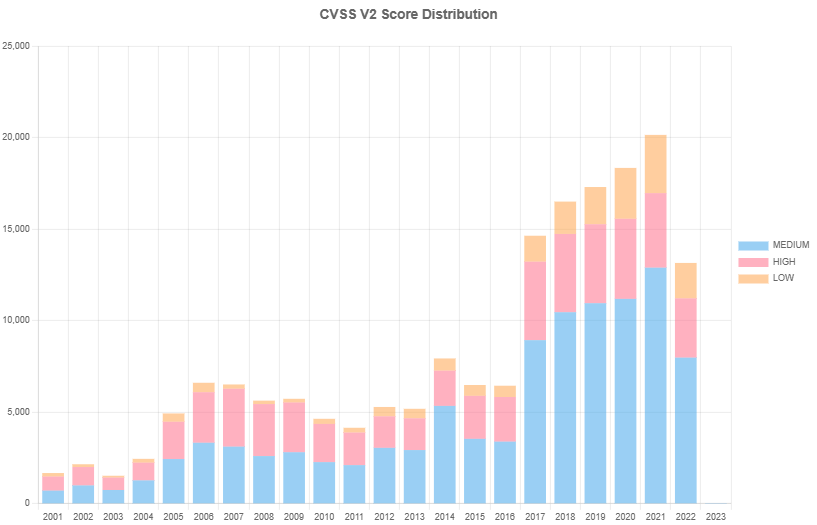
Source: National Vulnerability Database#
Clearly, it can be difficult to keep up with all the requried patches to fix these vulnerabilities, and U.S. companies increasingly rely on commercial software with known vulnerabilities. Even when vulnerabilities are exposed, many corporate IT organizations prefer to use already installed software as is rather than implement security fixes that will either make the software harder to use or eliminate “nice-to-have” features that will help sell the software to end-users.
Increasing Sophistication of Those Who Would Do Harm#
Previously, the stereotype of a computer troublemaker was that of an introverted “geek” working on his or her own and motivated by the desire to gain some degree of notoriety. This individual was armed with specialized, but limited, knowledge of computers and networks and used rudimentary tools, perhaps downloaded from the Internet, to execute his or her exploits. While such individuals still exist, it is not this stereotyped individual who is the biggest threat to IT security. Today’s computer menace is much better organized and may be part of an organized group (for example, Anonymous, Chaos Computer Club, Lizard Squad, TeslaTeam, and hacker teams sponsored by national governments) that has an agenda and targets specific organizations and websites. Some of these groups have ample resources, including money and sophisticated tools to support their efforts. Today’s computer attacker has greater depth of knowledge and expertise in getting around computer and network security safeguards. Table below summarizes the types of perpetrators of computer mischief, crime, and damage.
Type of perpetrator |
Description |
|---|---|
Black hat hacker |
Someone who violates computer or Internet security maliciously or for illegal personal gain (in contrast to a white hat hacker who is someone who has been hired by an organization to test the security of its information system). |
Cracker |
An individual who causes problems, steals data, and corrupts systems. |
Malicious insider |
An employee or contractor who attempts to gain financially and/or distrupt a company’s information systems and business operations. |
Industrial spy |
An individual who captures trade secrets and attempts to gain an unfair competitive advantage. |
Cybercriminal |
Someone who attacks a computer system or network for financial gain. |
Hacktivist |
An individual who hacks computers or websites in an attempt to promote a political ideology. |
Cyberterrorist |
Someone who attempts to destroy the infrastructure components of governments, financial institutions, and other corporations, utilities, and emergency response units. |
Types of Exploits#
There are numerous types of computer attacks, with new varieties being invented all the time. This section discusses some of the more common attacks, including ransomware, viruses, worms, Trojan horses, blended threats, spam, distributed denial-of-service (DDoS) attacks, rootkits, advanced persistent threats, phishing and spear phishing, smishing and vishing, cyberspionage, and cyberterrorism.
While we usually think of such exploits being aimed at computers, smartphones continue to become more computer capable. Increasingly, smartphone users store an array of personal identity information on their devices, including credit card numbers and bank account numbers. Smartphones are used to surf the web and transact business electronically. The more people use their smartphones for these purposes, the more attractive these devices become as targets for cyberthieves. One form of smartphone malware runs up charges on users’ accounts by automatically sending messages to numbers that charge fees upon receipt on a message.
Ransomware#
Ransomware is malware that stops you from using your computer to accessing your data until you meet certain demands, such as paying a ransom or sending photos to the attacker. A computer becomes infected with ransomware when a user opens an email attachment containing the malware or is lured to a compromised website by a deceptive email or pop-up window. Ransomware can also be spread through removable USB drives or by texting applications such as Yahoo Messenger, with the payload disguised as an image.
In early February 2016, Hollywood Presbyterian Medical Center was forced to shut down its computer network after hackers encrypted some of its data and demanded a ransom be paid before the data would be unlocked. Initially, the hospital refused to pay the ransom, and hospital employees were forced to resort to paper, pencil, phones, and fax machines to carry out many of their tasks, including accessing patient data. The hospital sought help from the FBI, the Los Angeles Police Department, and cybersecurity consultants, but it was unable to access the data. After a week, the hospital paid the ransom of $12,000. By February 15, access to the data was fully restored, and according to a hospital spokesperson, there was no evidence that any patient or employee data had been accessed.
Viruses#
Computer virus has become an umbrella term for many types of malicious code. Technically, a virus is a piece of programming code, usually disguised as something else, that causes a computer to behave in an unexpected and usually undesirable manner. For example, a virus may be programmed to display a certain message on an infected computer’s display screen, delete or modify a certain document, or reformat the hard drive. Almost all viruses are attached to a file, meaning the virus executes only when the infected file is opened. A virus is spread to other machines when a computer user shares an infected file or sends an email with a virus-infected attachment. In other words, viruses are spread by the action of the “infected” computer user.
Macro viruses have become a common and easily created form of virus. Attackers us an application macro language (such as Visual Basic or VBScript) to create programs that infect documents and templates. After an infected document is opened, the virus is executed and infects the user’s application templates. Macros can insert unwanted words, numbers, or phrases into documents or alter command functions. After a macro virus infects a user’s application, it can embed itself in all future documents created with the aplication. The “WM97/Resume.A” virus is a Word macro virus spread via an email message with the subject line “Resume - Janet Simons.” If the email recipient clicks on the attachment, the virus deletes all data in the user’s computer or mobile device.
Worms#
Unlike a computer virus, which requires users to spread infected files to other users, a worm is a harmful program that resides in the active memory of the computer and duplicates itself. Worms differ from viruses in that they can propagate without human intervention, often sending copies of themselves to other computers by email. A worm is capable of replicating itself on your computer so that it can potentially send out thousands of copies of itself to everyone in your email address book, for example.
The negative impact of a worm attack on an organization’s computers can be considerable—lost data and programs, lost productivity due to workers being unable to use their computers, additional lost productivity as workers attempt to recover data and programs, and lots of effort for IT workers to clean up the mess and restore everything to as close to normal as possible. The cost to repair the damage done by each of the Code Red, SirCam, and Melissa worms was estimated to exceed $1 billion, with that of the Conficker, Storm, and ILOVEYOU worms totalling well over $5 billion.
Trojan Horses#
A Trojan horse is a seemingly harmless program in which malicious code is hidden. A victim on the receiving end of a Trojan horse is usually tricked into opening it because it appears to be useful software from a legitimate source, such as an update for software the user currently has installed on his or her compuoter. The programs’ harmful payload might be designed to enable the hacker to destroy hard drives, corrupt files, control the computer remotely, launch attacks against other computers, steal passwords, or spy on users by recording keystrokes and transmitting them to a server operated by a third-party. A Trojan horse often creates a “backdoor” on a computer that enables an attacker to gain future access to the system and compromise confidential or private information.
A Trojan horse can delivered via an email attachment, downloaded to a user’s computer when he or she visits a website, or contracted via a removable media device, such as a DVD or USB memory stick. Once an unsuspecting user executes the program that hosts the Trojan horse, the malicious payload is automatically launched as well—with no telltale signs. Common host programs include screen savers, greeting card systems, and games.
Department of Homeland Security (DHS) officials say they have evidence that harmful Trojan horse malware has been planted in the software that runs much of the U.S. critical infrastructure, including oil and gas pipelines, power transmission grids, water distribution and filtration systems, and even nuclear power generation plants. DHS believes that the malware was planted by the Russians as early as 2011 as a deterrent to a U.S. cyberattack on Russia. The Trojan horse would allow non-authorized users to control or shut down key components of U.S. infrastructure remotely from their computer or mobile device.
Another type of Trojan horse is a logic bomb, which executes when it is triggered by a specific event. For example, logic bombs can be triggered by a change in a particular file, by typing a specific series of keystrokes, or at a specific time or date. Malware attacks employing logic bombs, compromised some 32,000 Windows, Unix, and Linux systems at half a dozen South Korean organizations, including three major television broadcasters and two large banks. A component of the attack was “wiper” malware triggered by a logic bomb set to begin overwriting a computer’s master boot record at a pre-set time and day.
Blended Threat#
A blended threat is a sophistical threat that combines the features of a virus, worm, Trojan horse, and other malicious code into a single payload. A blended threat attack might use server and Internet vulnerabilities to initiate and then transmit and spread an attack on an organization’s computing devices, using multiple modes to transport itself, including email, Internet Relay Chat (IRC), and file-sharing networks. Rather than launching a narrowly focused attack on specific EXE files, a blended threat might attack multiple EXE files, HTML files, and registry keys simultaneously.
Spam#
Email spam is the use of email systems to send unsolicited email to large numbers of people. Most spam is a form of low-cost commercial advertising, sometimes for questionable products such as pornography, phony get-rich-quick schemes, and worthless stock. Spam is also an extremely inexpensive marketing tool use by many legitimate organizations. For example, a company might send email to a broad cross section of potential customers to announce the release of a new product in an attempt to increase initial sales. However, spam is also used to deliver harmful worms and other malware.
The cost of creating an email campaign for a product or service can beseveral hundreds to a few thousand dollars, compared to tens of thousands of dollars for direct-mail campaigns. In addition, email campaigns might take only a couple of weeks (or less) to develop, compared with three months or more for direct-mail campaigns, and the turn-around time for feedback averages 48 hours for email as opposed to weeks for direct mail. However, the benefits of spam to companies may be largely offset by the public’s generally negative reaction to receiving unsolicited ads.
Spam forces unwanted and often objectionable material into email boxes, detracts from the ability of recipients to communicate effectively due to full mailboxes and relevant emails being hidden among many unsolicited messages, and costs Internet users and service providers millions of dollars annually. It takes user’s time to scan and delete spam email, a cost that can add up if they pay for Internet connection charges on an hourly basis (such as at an Internet cafe). It also costs money for Internet service provides (ISPs) and online services to transmit spam, which is reflected in the rates charged to all subscribers.
There is an even more sinister side to spam—often it is used to entice unsuspecting recipients to take actions that will result in malware being downloaded to their computer. In early 2015, Symantee, a provider of security, storage, and systems management solutions, began noticing multiple instances of short-duration, high-volume spam attacks targeting millions of users. The messages instructed recipients to click on a link to a URL, which, if done, resulted in the Trojan “Infostealer.Dyranges (Dyre)” being downloaded to their computer. This Trojan is known to steal financial information.
The Controlling the Assault of Non-Solicited Pornography and Marketing (CAN-SPAM) Act states that it is legal to spam, provided the messages meet a few basic requirements—spammers cannot disguise their identity by using a false return address, the email must include a label specifying that it is an ad or a solicitation, and the email must include a way for recipients to indicate that they do not want future mass mailings. Despite CAN-SPAM and other measures, the percentage of spam in email messages averaged 57% in one week in January 2015, according to Trustwave, an organization that helps businesses protect data and reduce security risks.
Many companies—including Google, Microsoft, and Yahoo!—offer free email services. Spammers often seek to use email accounts from such major, free, and reputable web-based email service providers, as their spam can be sent at no change and is less likely to be blocked. Spammers can defeat the registration process of the free email services by launching a coordinated bot attack that can sign up for thousands of email acounts. These accounts are then used by the spammers to sned thousands of untraceable email messages for free.
A partial solution to this problem is the use of CAPTCHA to ensure that only humans obtain free accounts. CAPTCHA (Completely Automated Public Turing Test to Tell Computers and Humans Apart) software generates and grades tests that humans can pass and all but the most sophisticated computer programs cannot. For exmaple, humans can read the distorted text, but simple computer programs cannot.
DDoS Attacks#
A distributed denial-of-service (DDoS) attack is one in which a malicious hacker takes over computers via the Internet and causes them to flood a target site with demands for data and other small tasks. A DDoS attack does not involve inflitration of the targeted system. Instead, it keeps the target so busy responding to a stream of automated requests that legimitate users cannot get in—the Internet equivalent of dialing a telephone number repeatedly so that all other callers hear a busy signal. The targeted machine essentially holds the line open while waiting for a reply that never comes; eventually, the requests exhaust all resources of the target.
The software required to initiate a DDoS is simple to use, and many DDoS tools are readily available at a variety of hacker sites. In a DDoS attack, a tiny program is downloaded surreptitiously from the attacker’s computer to dozens, hundreds, or even thousands of computers all over the world. The term botnet is used to describe a large group of such computers, which are controlled from one or more remote locations by hackers, without the knowledge or consent of their owners. The collective processing capacity of some botnets exceeds that of the world’s most powerful supercomputers. Based on a command by the attacker or at a preset time, the botnet computers (called zombies) go into action, each sending a simple request for access to the target site again and again—dozens of times per second. The target computers become so overwhelmed by requests for service that legitimate users are unable to get through to the target computer.
Dyn is an Internet performance mangement company that provides network services including Domain Name System (DNS) services for its many clients. DNS is a large distributed database that translates the domain name you enter into your browser (for example, soccervillage.com) into the IP address of the device hosting the website for that domain name (for example, 206.35.184.101). Without DNS, your website is “invisible” to users who only know it by its domain name. Starting October 21, 2016, Dyn was hit with a series of massive DDoS attacks. Millions of users on the East coast were unable to reach the websites of Dyn’s clients, including Airbnb, Amazon, Comcast, Etsy, GoFundMe, New York Times, PayPal, Shopify, and Twitter. The attack had a severe impact on the website owners, who were unable to provide customer services or generate e-commerce revenue.
Rootkit#
A rootkit is a set of programs that enables its user to gain administrator-level access to a computer without the end-user’s consent or knowledge. Once installed, the attacker can gain full control of the system and even obscure the presence of the rootkit from legitimate system administrators. Attackers can use the rootkit to execute files, access logs, monitor user activity, and change the computer’s configuration. Rootkits are one part of a type of blended threat that consits of a dropper, a loader, and a rootkit. The dropper code gets the rootkit installation started and can be activated by clicking on a link to a malicious website in an email or opening an infected PDF file. The dropper launches the loader program and then deletes itself. The loader loads the rootkit into memory; at that point, the computer has been compromised. Rootkits are designed so cleverly that it is difficult even to discover if they are installed on a computer. The fundamental problem with trying to detect a rootkit is that the operating system cannot be trusted to provide valid test results. The following are some symptoms of rootkit infections:
The computer locks up or fails to respond from the keyboard or mouse.
The screen saver changes without any action on the part of the user.
The taskbar disappears.
Network activities function extremely slowly.
When it is determined that a computer has been infected with a rootkit, there is little to do but reformat the disk; reinstall the operating system and all applications; and reconfigure the user’s settings, such as mapped drives. This can take hours, and the user may be left with a basic working machine, but all locally held data and settings may be lost.
The “2012 rootkit virus” is a nasty piece of malware that deletes information from a computer and makes it impossible to run some applications, such as Microsoft Word. The longer the rootkit is present, the more damage it causes. The virus asks users to install what appears to be a legitimate update to their antivirus software or some other application. By the time the user sees the prompt to install the software, it is too late; the computer has already been infected by the rootkit.
Advanced Persistent Threat#
An advanced persistent threat (APT) is a network attack in which an intruder gains access to a network and stays there—undetected—with the intention of stealing data over a long period of time (weeks or even months). Attackers in an APT must continuously rewrite code and employ sophisticated evasion techniques to avoid discovery. APT attacks target organizations with high-value information, such as banks and financial institutions, government agencies, and insurance companies with the goal of stealing data rather than disrupting services.
An APT attack advances through the following five phases:
- Reconnaissance
The intruder begins by conducting reconnaissance on the network to gain useful information about the target (security software installed, computing resources connected to the network, number of users).
- Incursion
The attacker next launches incursions to gain access to the network at a low level to avoid setting off any alarms or suspicion. Some forms of spear phishing may be employed in this phase. After gaining entrance, the attacker establishes a back door, or a means of accessing a computer program that bypasses security mechanisms.
- Discovery
The intruder now begins a discovery process to gather valid user credentials (especially administrative ones) and move laterally across the network, installing more back doors. These back doors enable the attacker to install bogus utilities for distributing malware that remains hidden in plain sight.
- Capture
The attacker is now ready to access unprotected or compromised systems and capture information over a long period of time.
- Export
Captured data are then exported back to the attacker’s home base for analysis and/or used to commit fraud and other crimes.
Although APt attacks are difficult to identify, the theft of data can never be completely invisible. Detecting anomalies in outbound data is perhaps the best way for an administrator to discover that the network has been the target of an APT attack.
The hacker group Carbanak is thought to have stolen over $1 billion from banks in China, Russia, the Ukraine, and the United States. The group’s modus operandi include use of an APT that initially hooks its victims using spear phishing emails imitating legitimate banking communications. The group performs a reconnaissance phase to gather data about system administrators and then uses this information to navigate through various bank systems, including ATMs, financial accounts, and money processing services. Once access to these systems is gained, the hackers steal money by transferring funds to accounts in China and the United States. They have even programmed ATMs to dispense money at specific times for collection by money mules.
Phishing#
Phishing is the act of fraudulently using email to try to get the recipient to reveal personal data. In a phishing scam, con artists send legitimate-looking emails urging the recipient to take action to avoid a negative consequence or to receive a reward. The requested action may involve clicking on a link to a website or opening an email attachment. These emails lead consumers to counterfeit websites designed to trick them into divulging personal data or to download malware onto their computers.
Spear phishing is a variation of phishing in which the phisher sends fraudulent emails to a certain organization’s employees. It is known as spear phishing because the attack is much more precise and narrow, like the tip of a spear. The phony emails are designed to look like they came from high-level executives within the organization. Employees are directed to a fake website and then asked to enter personal information, such as name, Social Security number, and network passwords. Botnets have become the primary means for distributing phishing scams.
Smishing and Vishing#
Smishing is another variation of phishing that involves the use of texting. In a smishing scam, people receive a legitimate-looking text message telling them to call a specific phone number or log on to a website. This is often done under the guise that there is a problem with the recipient’s bank account or credit card that requires immediate attention. However, the phone number or website is phony and is used to trick unsuspecting victims into providing personal information such as a bank account number, personal identification number, or credit card number, which can then be used to steal money from victims’ bank accounts, charge purchases on their credit cards, or open new accounts. In some cases, if victims log on to a website, malicious software is downloaded onto their smartphones, providing criminals with access to information stored on the phones. The number of smishing scams typically increases around the holidays as more people use their smartphones to make online purchases.
Vishing is similar to smishing except that the victims receive a voice-mail message telling them to call a phone number or access a website.
Financial institutions, credit card companies, and other organizations whose customers may be targeted by criminals in this manner hsould be on the alert for phishing, smishing, and vishing scams. They must be prepared to act quickly and decisively, without alarming their customers if such a scam is detected.
Recommended action steps for institutions and organizations include the following:
Companies should educate their customers about the dangers of phishing, smishing, and vishing through letters, recorded messages for those calling into the company’s call center, and articles on the company’s website.
Call center service employees should be trained to detect customer complaints that indicate a scam is being perpetrated. They should attempt to capture key pieces of information, such as the callback number the customer was directed to use, details of the phone message or text message, and the type of information requested.
Customers should be notified immediately if a scam occurs. This can be done via a recorded message for customers phoning the call center, working with local media to place a news article in papers serving the area of the attack, placing a banner on the institution’s web page, and even displaying posters in bank drive-through and lobby areas.
If it is determined that the calls are origination from within the United States, companies should report the scam to the FBI.
Institutions can laso try to notify the telecommunications carrier for the particular numbers to request that they shut down the phone number’s victims are requested to call.
Glossary#
- Backdoor#
A hidden, undocumented access point in a software program, operating system, or hardware device. It allows a programmer or an attacker to bypass normal Computer Backdoor security controls and gain remote access to a system.
- Bogus utilities#
Refers to fake software programs, tools, or apps that appear to be helpful system utilities (such as cleaners, optimizers, or antivirus scans) but actually contain malware or scam users.
- Bring Your Own Device (BYOD) Policy#
A set of rules that lets employees use their personal phones, tablets, or computers for work tasks.
- Chief Information Security Officer (CISO)#
A senior executive responsible for creating and carrying out a company’s cybersecurity and information protection strategy.
- Con artist#
A digital imposter or social engineer who uses trickery, lies, and manipulation to gain a victim’s trust and steal sensitive data, money, or network access.
- Corporate Intranet#
A private, secure digital network that an organization uses to share company information, tools, and resources exclusively with its employees.
- Cyber attack#
An intentional effort by malicious actors to gain unauthorized access to, disrupt, or destroy a computer system, network, or digital device.
- Cybercrime#
Any criminal activity that uses a computer, digital device, or computer network to commit or facilitate an illegal act.
- Cybersecurity#
The practive of protecting computers, networks, programs, and data from digital attacks, theft, or unauthorized access.
- Exploit#
To use something or someone for profit, advantage, or progress, often in a way that is unfair or unethically driven.
- Incursion#
An unauthorized and hostile entry into a computer network, system, or digital domain.
- Infostealer.Dyranges#
A specific detection signature used by antivirus programs (most notable Symantec/Norton) to classify a family of malicious software designed to secretly harvest sensitive data from infected devices.
- Internet Service Provider#
A company that gives people and businesses access to the Internet.
- Macro virus#
A harmful computer program hidden inside a data file, like a Word document or Excel sheet. It uses the file’s built-in automation tool—called a macro—to run bad code as soon as you open the file, allowing it to damage files or spread to other computers.
- Malware#
Short for “malicious software”; any program or code intentionally designed to damage, disrupt, or steal data from a computer, device, or network.
- Money mule#
A person who transfers or moves illegally acquired money on behalf of someone else.
- Outbound data#
Any information, traffic, or communication that originates inside a private or internal network and moves outward toward an external destination on the internet.
- Patch#
A small set of code changes designed to fix bugs, close security flaws, or improve performance in an existing program without requiring a full reinstallation.
- Payload#
The core, useful data being transported, transmitted, or delivered.
- Perpetrators#
Individuals or groups who deliberately use computers, networks, or digital tools to cause disruption, damage, or unauthorized interference.
- Prevalence#
How commonly or widely a specific moral issue, digital behavior, or ethical violation occurs within a computerized society.
- Reconnaissance#
The preliminary intelligence-gathering phase of a cyberattack where adversaries collect information about a target system, network, or organization to identify vulnerabilities and plan exploitation.
- Security Breach#
Any incident where an unauthorized person or system bypasses security rules to gain acccess to a network, device, application, or physical space.
- Surreptitiously#
Doing something secretly, stealthily, or without being noticed by others.
- Ubiquitous#
Existing or seeming to be everywhere at the same time.
- Vulnerabilities Equities Process (VEP)#
U.S. government decision-making framework to determine whether to disclose a newly discovered zero-day computer security vulnerability to a vendor for patching or to withhold it for national security, intelligence, or law enforcement operations.
- White hat hacker#
An ethical cybersecurity professional who uses hacking skills with full permission to find and fix security flaws in computer systems.
- Zero-Day Exploit#
A cyberattack that targets an unknown or unpatched security flaw in software or hardware before the developer knows about it or has time to fix it.